Building a Visual Planning System with Month Day Titles Digital Stickers
Digital planning has moved far beyond simple calendar entries and generic to-do lists. The people who get the most from their digital notebooks understand that structure and visual clarity shape how they interact with information. Month Day Titles Digital Stickers serve a specific function in this ecosystem: they make temporal navigation immediate, reducing the cognitive load of parsing dates so you can focus on what actually needs to happen.
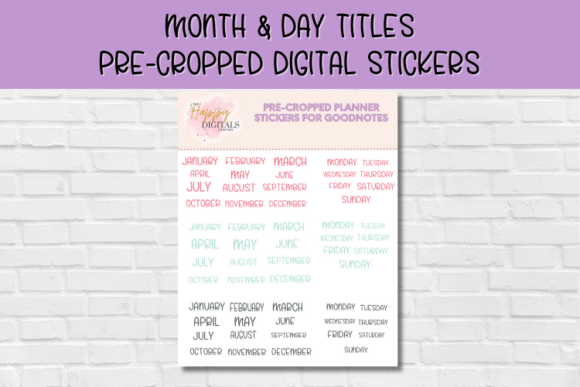
These are precropped digital stickers designed for apps like Goodnotes, which means you are not resizing raw images or fiddling with awkward cutouts. You tap, place, and move on. For someone new to digital planning, that simplicity removes a barrier that often causes people to abandon the tool before they build the habit. For experienced planners, it shaves seconds off repetitive setup tasks that compound across weeks and months.
What Month Day Titles Digital Stickers Actually Provide
At their core, these assets are stylized text elements representing months, days of the week, and numerical dates. They go beyond basic handwriting or typed text because they carry a consistent aesthetic weight. A well-designed set gives you visual anchors that help the eye scan a page and land on the relevant timeframe without effort. That matters when you are reviewing a packed weekly spread or cross-referencing project timelines.
The precropped nature of the files is not a minor convenience—it is a functional difference. Cropping individual PNGs by hand invites inconsistency. One sticker sits slightly off-center, another overlaps a margin line, and before long the layout feels chaotic. Precropped assets solve that at the source. You download a collection structured around month names, day abbreviations, and title treatments that are ready to deploy the moment they land in your photo library or sticker book within Goodnotes.
Where These Assets Fit in a Broader Planning Workflow
Planning a new month typically follows a three-phase rhythm: preparation, active use, and retrospective review. Month Day Titles Digital Stickers touch each phase, though their role shifts depending on the context.
Preparation and Setup
Before a month begins, you are likely setting up spreads—monthly overviews, weekly layouts, habit trackers, content calendars, or budget pages. Typing out "AUGUST" in a plain font works, but it does not signal importance to your brain the way a designed title element does. Visual weight influences attention. When you place a bold, stylized month title at the top of a spread, you create a clear declaration of what that page contains.
Day titles serve a similar purpose on weekly spreads. Instead of scribbling "Monday" five times across different sections, you drop a coordinated sticker that matches the month's visual language. The repetition builds continuity. When you flip through pages weeks later, the consistent treatment makes the planner feel intentional rather than thrown together.
Active Use During the Month
Throughout the month, you may add supplementary pages—meeting notes, brainstorm sheets, project breakdowns. Marking those pages with a date sticker or day title connects them to the broader timeline. Without that marker, a standalone note page becomes orphaned context. Three months later, you will not remember which week that brainstorming session belonged to. A small "WED 17" sticker at the top solves that permanently.
This is also where precropped assets shine. You are in the middle of a workflow. You do not want to stop, open a separate editing app, crop a title, export it, and reimport it. You want to reach into your sticker collection, grab the element, and place it in under five seconds. The friction difference determines whether you actually use the tool or default to messy handwriting that you later regret.
Review and Archival Reference
After a month closes, you may revisit pages to extract data, review decisions, or pull content for reports and content repurposing. Month Day Titles Digital Stickers act as indexing markers. A quick scroll through thumbnail views of your notebook shows you exactly where each month and week begins because the visual titles are distinct at small sizes. Plain handwritten dates do not offer the same scannability.
This archival benefit is often overlooked during initial enthusiasm about aesthetics. But the planners that serve you longest are the ones you can actually navigate months later without frustration.
How These Stickers Interact with Other Planning Tools
No digital planning element works in isolation. Month and day titles sit alongside functional trackers, habit logs, goal-setting frameworks, and project timelines. Their job is to contextualize those elements without competing for attention. A well-chosen title set harmonized with your broader sticker collection creates a unified visual system.
Consider how they interact with:
- Functional trackers: A habit tracker needs a clear time label. The month title sticker defines the tracking period at a glance.
- Content calendars: For bloggers, marketers, and publishers, day titles segment publishing schedules so you instantly see which content goes live on which date.
- Budget pages: Financial planning relies on time-bound categorization. Month titles label spending periods unambiguously.
- Project timelines: When you break a project into phases, dated section headers prevent phase confusion during fast-moving sprints.
- Learning logs: Students and self-directed learners benefit from dated entries that track progress through a curriculum or skill acquisition sequence.
The titles do not replace functional elements—they frame them. That framing matters because temporal context is often the first piece of information you need when orienting yourself on any page.
Integration with Digital Platforms and Methods
Goodnotes is the primary platform most users associate with precropped digital stickers, and for solid reasons. Its lasso tool, image placement precision, and element saving features make sticker use frictionless. But the same assets work across other PDF annotation apps that support image insertion—Notability, Noteshelf, Collanote, and even some project management tools that allow visual attachments.
The key to smooth integration is organizing your sticker collection before you need it. Many users make the mistake of dumping all downloaded stickers into a single folder and then scrolling endlessly during setup. A better approach: create a dedicated sticker notebook or use Goodnotes' built-in elements feature to store Month Day Titles Digital Stickers by category—months in one collection, day abbreviations in another, date numbers in a third. The upfront organization takes ten minutes and pays back hours over subsequent months.
Some planners also pair month and day titles with hyperlinked digital planners purchased from independent creators. The titles add a layer of customization to otherwise template-driven layouts. Instead of accepting the pre-installed fonts that ship with the planner, you layer your chosen title stickers on top, creating a hybrid look that feels personalized while retaining the structural benefits of the hyperlinked framework.
Practical Implementation Tips for New Users
If you are new to digital planning and have just acquired a set of month and day title stickers, the range of options can feel overwhelming. Start small. Set up one monthly spread with a month title and the first week's day labels. Use that for seven days before expanding the system. This incremental approach prevents the common pitfall of spending three hours on elaborate spreads that you abandon because the maintenance burden outweighs the benefits.
Here are specific implementation practices worth adopting:
- Establish a placement convention. Decide where month titles always go—top center, top left corner, or integrated into a header bar. Consistency builds recognition speed.
- Match day title size to functional space. If your weekly spread has small header boxes for each day, resize the stickers proportionally so the text remains legible without overwhelming the container.
- Use color coding intentionally. If the sticker set includes multiple colorways, assign meanings—cool tones for work-related months, warm tones for personal seasons, or brand colors for business planning. This adds a layer of information beyond the text itself.
- Keep a backup of unused originals. Avoid modifying your base sticker files directly. Duplicate and resize copies inside Goodnotes so you always have the original resolution available for other uses.
- Combine with date dots or functional icon stickers. A day title sticker next to a small icon indicating a key event type (meeting, deadline, personal event) packs dense information into a compact space.
Quality Factors That Affect Long-Term Usability
Not all digital sticker sets are created equally, and paying attention to quality markers ensures your planning system remains functional rather than becoming a source of annoyance. Resolution is the most practical concern. Low-resolution title stickers look fine when placed but degrade noticeably if you resize them or view the page on a larger screen. Look for assets delivered at 300 DPI or higher, which matches or exceeds the display capabilities of most tablet screens.
Transparency handling matters as well. Properly isolated PNGs with clean edges blend seamlessly onto any background—grid, dot, lined, or blank. Poorly isolated files leave visible artifacts that cheapen the look of an otherwise polished spread. The best creators test their stickers against multiple background types before releasing them.
File naming conventions might seem trivial but affect searchability. A sticker set with descriptive filenames like "August-Title-Gold.png" is far easier to navigate than "IMG_4829.png." This becomes crucial when you accumulate multiple sticker packs across months of digital planning. The time spent renaming files upfront prevents the frustration of blind searches later.
Using Month and Day Titles Beyond Personal Planning
While personal productivity is the most obvious use case, these assets serve professional and creative contexts effectively. Freelancers managing client work benefit from clearly dated project timelines within client-specific notebooks. Educators can build visually organized lesson plan notebooks where month and day titles structure curriculum pacing guides. Small business owners running social media accounts use day titles to segment content batches across posting schedules.
Creative professionals often use digital planners as hybrid sketchbook-planners. A designer might maintain pages that blend meeting notes with visual inspiration, and the date stickers provide chronological anchoring without disrupting the creative flow of the page. The stickers mark time without demanding attention—they sit quietly until you need the temporal reference.
The adaptability of these assets means the same set that organizes your personal monthly budget can also structure a product launch timeline or a course creation schedule. The investment in a quality sticker collection distributes across every planning context you maintain.
Avoiding Common Early-Stage Mistakes
New digital planners often over-decorate, layering so many stickers that the functional information becomes hard to locate. Month and day titles should anchor a page, not overwhelm it. If your eye does not know where to land, you have likely crossed the line from structured enhancement into visual noise.
Another mistake is rigid adherence to a single layout across all contexts. A month title placement that works beautifully on a calendar spread may crowd a dense project planning page with limited header space. Give yourself permission to adapt placement to the page type while keeping the title style consistent. Consistency of visual language matters more than identical positioning.
Storage creep deserves attention too. Digital sticker collections grow quickly. Without periodic curation, you accumulate assets you never use, which slows down the selection process during actual planning sessions. Review your sticker library quarterly, archive what no longer fits your visual system, and keep only what you actively reach for. Month Day Titles Digital Stickers that earn their place in your rotation are the ones that match your actual planning rhythm and aesthetic preferences, not the ones that looked appealing in a product listing.
Expanding Your System Over Time
Once month and day titles are firmly integrated into your planning routine, the system naturally expands. You might add seasonal title variants, quarterly review headers, or year-at-a-glance labels. These extensions follow the same principles—precropped, immediately usable, visually cohesive with your existing collection. The foundation you build with basic month and day titles makes every subsequent addition easier to integrate because you already understand the placement logic, the sizing preferences, and the color conventions that work for your specific planning context.
The goal is not a visually perfect planner that impresses others. The goal is a planning environment where temporal context is always instantly available, setup friction is near zero, and the information you need rises to the surface without effort. Month Day Titles Digital Stickers earn their place in that environment by doing one job exceptionally well: telling you when you are, so you can focus on what you are doing.