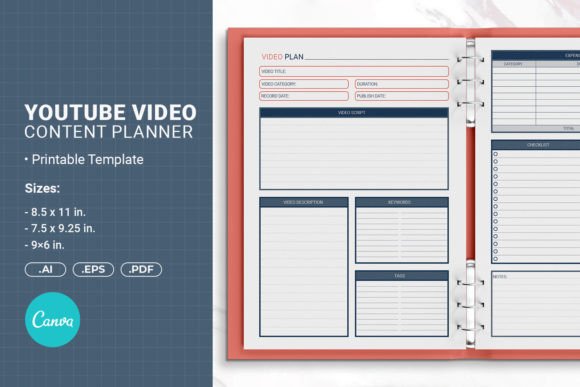
YouTube Video Content Planner: Organize & Grow Your Channel
Growing a YouTube channel without a plan feels like shouting into the void. You hit record, edit, upload—then wait, hoping the algorithm somehow notices. A YouTube Video Content Planner changes that pattern entirely. It’s not just a calendar or a notebook. It’s a structured system that helps you track ideas, map out scripts, schedule uploads, and actually follow through without burning out. If you’ve ever stared at a blank screen wondering what to film next, this tool becomes your creative anchor.
At its core, a YouTube planner bridges the gap between inspiration and execution. You might have dozens of video ideas bouncing around, but without a place to capture and refine them, most vanish. A well-designed planner gives each idea a home—whether it’s a physical booklet, a digital PDF, or a customizable Canva template. You can sketch thumbnails, outline key talking points, assign dates, and check off tasks as you go. It’s surprisingly satisfying to see a month of content laid out before you’ve even charged your camera battery.
What Makes a YouTube Video Content Planner Useful
Not all planners are built the same. The best YouTube planners go beyond empty grids and generic to‑do lists. They often include sections tailored specifically for video creators: hooks to grab attention in the first 10 seconds, B‑roll shot lists, SEO keyword prompts for titles and descriptions, and even space to draft a thumbnail concept. These small touches nudge you away from chaotic uploading and toward intentional storytelling.
Imagine opening a template that asks, “What problem does this video solve for your audience?” or “Which three emotions do you want viewers to feel?” Those questions spark creative depth that a plain notebook rarely triggers. A YouTube Video Content Planner becomes a thinking partner, helping you produce material that resonates instead of just filling airtime. Whether you’re a solo vlogger, a brand strategist, or an educator, that structure keeps your content aligned with both your voice and your viewers’ expectations.
Creative Possibilities Beyond the Basic Upload Schedule
Many users first grab a planner to stop missing upload days, but its potential stretches much further. For instance, you can use the planner to design themed series that hook viewers to return next week. Instead of listing isolated video topics, map out a 4‑part tutorial arc, a 6‑episode behind‑the‑scenes documentary, or a monthly challenge. Each page becomes a storyboard for a bigger narrative, not just a standalone piece.
You can also treat the planner as a collaboration tool. If you work with editors, thumbnail designers, or guest hosts, a shared digital version—maybe a Canva link or PDF—keeps everyone on the same page. Color‑code tasks, leave notes, and track revisions without drowning in emails. Even if you’re a one‑person operation, using a planner pushes you to think like a creative director: you step back, evaluate the overall rhythm of your content, and spot opportunities to experiment with formats, lengths, or posting frequencies you hadn’t considered.
How Different Creators Adapt the Same Planner
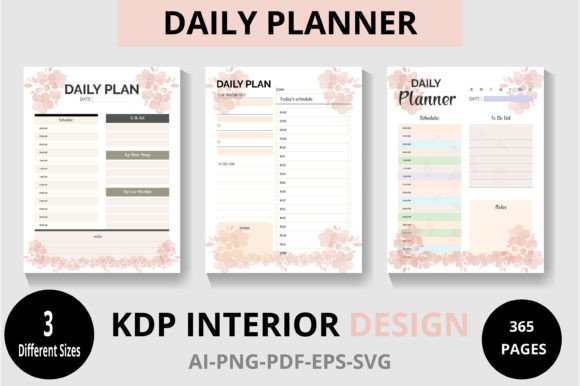
Flexibility is the real superpower here. A YouTube Planner template that ships in multiple sizes—say, a compact 6×9 inch version, a mid‑size 7.5×9.25, and a full‑page 8.5×11—already hints at varied uses. The small one tucks into a gear bag for on‑the‑go brainstorming; the large one sits on a desk for detailed weekly reviews. But beyond physical dimensions, let’s look at how three distinct types of creators might fill those pages.
- The Educator or Coach: Structures each video around a clear learning outcome. The planner’s outline section becomes a lesson plan: hook, core concept, example, recap, call to action. They track which topics performed well and build a curriculum map across several months.
- The Creative Storyteller: Uses the planner to capture emotional beats. They doodle scene transitions, write script fragments, and pin mood references. Upload dates are less rigid, but they block “creative development” days to keep the pipeline flowing without stifling spontaneity.
- The Small Business Owner: Aligns videos with product launches, seasonal promotions, and customer FAQs. The planner doubles as a marketing calendar. They note target keywords, track competitors’ upload rhythms, and ensure every video has a clear conversion path.
Even within the same template, a wellness coach might fill the “B‑roll ideas” section with calming nature shots and overlaid text quotes, while a tech reviewer lists close‑up product angles and comparison charts. The template doesn’t box you in; it provides guardrails you can reinterpret.
From Blank Page to Finished Video: A Practical Walkthrough
Let’s ground this with a realistic example. Suppose you run a cooking channel and you’ve just downloaded a YouTube Video Content Planner. You open the weekly spread. On Monday, you pick a recipe and fill the “Hook” field: “You’re overcooking your pasta—here’s the 3‑minute fix.” That one line clarifies your entire script direction. Then you jot down the equipment list (mic, two cameras, lights) and a rough ingredient shopping list. Tuesday, you outline the step‑by‑step shots. Wednesday morning, you film; afternoon, you edit and note timestamps. Thursday, you write the description, grabbing low‑competition keywords you brainstormed in the planner’s SEO box. Friday, you schedule the upload and plan a community post to accompany it.
Because the planner has space for reflections, you later record what worked: the hook led to a 12% higher click‑through rate. That insight directly influences your next video. Without that reflection section, you might repeat a less effective approach. Over weeks, these micro‑learnings compound. Your channel grows not by luck, but because you’re systematically testing and refining.
Keeping Your Planning System Audience‑Friendly and Original
It’s easy to fall into the trap of copying what other creators do. A planner can actually safeguard originality, provided you use it to ask the right questions. Before you settle on a topic, flip to a “competitive research” page if your template includes one, and note what others in your niche haven’t covered. Could you add a unique personal story, an uncommon interview, or a surprising metaphor? The planner then becomes a filter, not an echo chamber.
Equally important, keep the viewer’s experience in mind. If your planner includes a content checklist, add your own item: “Is the value obvious within the first five seconds?” or “Does the title promise something the video actually delivers?” A YouTube Planner with editable fields lets you embed these quality checks into your routine. Over time, you train yourself to produce videos that feel both fresh and trustworthy—exactly what platforms reward and audiences crave.
Organizing Assets, Deadlines, and Teams Without Overcomplicating
For channels with multiple contributors, the planner acts as a lightweight project management hub. An illustrator can upload thumbnail drafts to a shared Canva template; an editor can mark a video stage as “rough cut,” “ready for review,” or “final.” Instead of siloing tasks in separate apps, everyone references the same planner pages. This reduces miscommunication and speeds up the release cycle.
If you prefer pen and paper, consider printing planner sheets with a safe margin for hole punching binding—this way you can store months of planning in a binder, flipping back to analyze seasonal trends. Some creators bullet‑journal within the template, adding habit trackers for “upload consistency,” “watch time,” or “engagement rate.” That analog touch can feel more intentional than staring at yet another screen.
Making the Most of Multiformat Publishing
The modern creator often repurposes video content across shorts, podcasts, and blog posts. A forward‑thinking planner includes a “repurpose pipeline” area. When you plan a long‑form video, immediately draft one short idea, one tweet thread, and one email teaser. This multiplies the value of every recording session without adding a huge creative burden. Because the planner encourages you to capture these offshoots early, they feel integrated rather than slapped on afterward.
If your planner comes in an editable format—AI Illustrator files, EPS, or a Canva link—you can tweak sections to match your exact repurposing workflow. Add a column for “Platform X highlight” or “Pinterest pin text.” That level of personalization keeps the tool relevant even as your strategy evolves.
Balancing Structure with Spontaneous Creativity
Some creators worry that a planner might stifle spur‑of‑the‑moment inspiration. In practice, the opposite happens. A solid plan handles the scaffolding—research, technical specs, publishing logistics—so your brain is free to play during the actual creative work. When a sudden, timely idea strikes, you can slot it into the planner without derailing your entire week. The template’s flexibility means you can shift deadlines, swap topics, or insert an extra filming day without starting from scratch.
Think of it this way: a YouTube Video Content Planner isn’t a rigid contract; it’s a living document. You might block out a “wildcard” slot each month specifically for a trending topic or a viewer request. That way, you respect both your long‑term vision and the need to stay culturally relevant.
Why Clear, Consistent Planning Builds Viewer Trust
Audiences return to channels that deliver reliably—not necessarily on the same minute each week, but with a predictable quality and perspective. A planner helps you batch‑record during high‑energy weeks, then maintain consistency during low‑motivation stretches. When you’re feeling stuck, you can open a backlog of recorded but unedited ideas, which a well‑kept planner always has waiting. This steadiness signals to viewers (and to the algorithm) that your channel is active and dependable.
Moreover, a planner that includes space for viewer feedback and analytics allows you to close the loop. You notice that a particular format consistently underperforms, so you pivot. You spot a comment that becomes a whole video. Over time, this responsiveness builds trust, because your community sees that you actually listen.
Taking Your Self‑Publishing Journey Further
While we’ve focused on video content, the same principles carry over if you ever decide to compile your expertise into a book, an ebook, or a lead magnet. The discipline of planning, outlining, and repurposing material translates directly. The YouTube Planner template mentioned earlier—available in sizes like 6×9, 7.5×9.25, and 8.5×11 inches with print‑ready PDF files—can even serve double duty as a book interior formatting tool. That’s an unexpected bonus: the habits you build while mapping videos naturally sharpen your ability to structure longer written projects.
Whether you’re launching a channel from zero, scaling an existing one, or using video to support a book launch, having a dedicated planning system removes guesswork. Start with a simple template. Fill in one week. Let each small win accumulate. Before long, you’ll look back at a body of work that’s not only consistent but genuinely meaningful—to you and to the people watching.