Classroom Expenses Sheets: Smart Budgeting for Educators
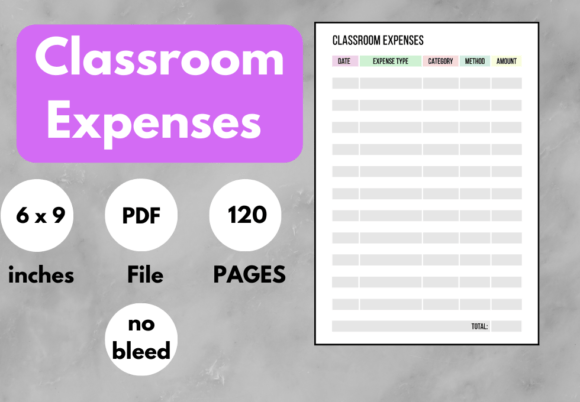
A classroom expenses sheet is simply a structured log—digital or on paper—used to record every dollar spent on supplies, resources, activities, and materials that support student learning. Whether you buy markers from a local dollar store, laminating pouches in bulk, or subscription software for virtual labs, a dedicated sheet transforms scattered receipts into a clear, trackable financial picture. More than a static list, a well-designed sheet helps forecast future needs, justify grant proposals, and even claim tax deductions at the end of the year.
Who Uses Classroom Expenses Sheets and Why It Matters to You
Different people approach classroom expense tracking with very different goals. Recognizing your primary reason for keeping a sheet helps you choose the right format and level of detail, saving hours of unnecessary work.
K–12 classroom teachers often reach for a sheet to log out-of-pocket purchases—an average of $500 to $750 per year, according to national surveys. For them, the sheet is a reimbursement tracker when parent–teacher organizations offer funds, and a critical document for the Educator Expense Deduction at tax time. Beginners usually need a clean, minimal layout with date, item description, category, amount, and a notes field. Speed and ease of use matter most because filling it out happens between classes or on a lunch break.
School administrators and department heads use classroom expenses sheets to monitor multiple classrooms or grade levels. They prioritize aggregation, reliability, and long-term data trends. A sheet might pull automatic totals by category—art supplies, technology, special education, field trips—so budget decisions are evidence-based. Here, flexibility and formula-driven summaries are valued over decorative design.
Homeschooling parents and parent–teacher organization (PTO) volunteers track shared costs and group-funded projects. A stay-at-home parent managing a homeschool co-op, for example, may need a sheet that splits expenses across families and shows real-time balances. For them, simplicity and clarity in presentation matter almost as much as the numbers, because the sheet often gets shared with a group.
Educational content creators, bloggers, and freelance tutors bring a business mindset to their classroom expenses sheets. A creator filming hands-on science experiments for a YouTube channel logs material costs as part of content production. A freelance reading specialist tracks assessment tools, printable laminates, and travel. They value commercial usefulness—how cleanly a sheet transfers to tax software or feeds profit/loss statements. They often look for sheet templates that integrate categories aligned with Schedule C filing.
Small business owners selling physical classroom kits or digital teaching resources use expense sheets as part of cost-of-goods-sold calculations. A crafter selling sensory bin kits needs to log raw material costs per unit to price correctly. A publisher creating leveled reading libraries tracks permissions, printing, and shipping. For these users, the sheet isn't just a log—it’s a live dashboard that feeds into marketing decisions and product viability assessments.
From Paper Templates to Automated Digital Sheets: Choosing Your Comfort Level
Your skill set and comfort with technology play a huge role in selecting a classroom expenses sheet that you’ll actually stick with.
A beginner might start with a simple printable PDF that has rows for date, store, purpose, and amount. Many free versions are available online, and they work reliably without needing an internet connection. The learning value here is immediate—you see where money goes without any setup frustration. However, manual totaling and recalculating remain a chore.
Experienced users often prefer a Google Sheets or Excel workbook that uses formulas and pivot tables. A single tab can become a yearly master tracker, while separate tabs hold monthly breakdowns. Automated color coding, threshold alerts (when supply spending hits a preset limit), and drop-down menus for categories speed up data entry and reduce errors. These users care about long-term usefulness and the ability to customize freely—adding grant-specific columns or linking expense records to lesson plan inventories.
Design-conscious creators and marketers might want a visually polished template that reflects a brand identity, especially if they share snapshots of their budget with an audience or clients. They might customize the sheet’s fonts, embed a logo, and use clear visual hierarchy. While aesthetics aren’t essential for accuracy, a well-presented sheet can reinforce credibility when applying for sponsored classroom materials or pitching a partnership.
Key Features That Match Different Priorities
Not every classroom expenses sheet is built the same. Understanding what features align with your own goals prevents overwhelm.
- Ease of use – Simple, pre-formatted cells and auto-calculating totals mean you’re more likely to maintain the habit. Ideal for time-strapped teachers and non-technical users.
- Cost – Many robust sheets are free, but premium templates with advanced dashboards or mobile app sync exist. A parent volunteer may never need a paid version, while a full-time tutor might justify the cost for a tool that directly feeds their accounting software.
- Flexibility vs. structure – A completely blank sheet offers limitless categorization but demands setup time. A structured template with predefined categories (e.g., basic supplies, books, technology, professional development) gives you a running start at the expense of some personalization.
- Presentation and sharing – If you need to present spending to administrators, grant committees, or co-op members, a sheet with clean charts, summary tiles, and clear totals builds trust faster than a scribbled notepad.
- Reliability and data backup – Digital sheets stored on cloud platforms reduce the risk of lost records. For tax purposes, lost receipts can mean lost deductions, so reliability is non-negotiable for those who claim educator expenses.
- Creativity in tracking – Some users build colorful trackers that double as bullet-journal-style layouts, turning expense logging into a calming routine. This creative angle appeals to hobbyists and those who value the emotional satisfaction of seeing a beautiful planner.
- Commercial and learning value – An entrepreneur getting serious about an education-based side hustle might use the sheet to learn the basics of bookkeeping in a low-stakes environment. The sheet becomes a teaching tool in itself.
A First-Year Teacher Tracking Reimbursable Spending
Marcus, a new fifth-grade teacher, keeps a minimalist classroom expenses sheet on his phone’s spreadsheet app. He logs every receipt immediately using columns: date, vendor, item, category, amount, and reimbursement status. At the end of each month, he emails a summary to the PTO and saves a PDF for his own tax file. For Marcus, speed and mobile-friendly access matter more than advanced features. He uses a free template he tweaked slightly to color unreimbursed rows in yellow.
A Parent-Run Homeschool Co-op Tracking Group Costs
Lena organizes weekly science workshops for eight families. Her classroom expenses sheet not only lists supplies bought but also shows how each $40 bulk purchase is split per child. She set up a living spreadsheet that calculates participant balances and sends automated email reminders through a simple script. For Lena, clarity and fairness are the top priorities; the sheet must be understandable to all parents and never feel like a confusing bill.
A Teacher-Author Creating Sellable Digital Resources
Priya designs printable math centers and sells them on educational marketplaces. She uses a dedicated sheet to track all expenses related to each product: clip art licenses, font purchases, software subscriptions, and printing samples. The sheet feeds directly into her pricing formula and end-of-year tax prep. For her, commercial value is paramount. She needs to see her profit margin per resource at a glance, so she built her classroom expenses sheets with detailed cost-per-unit calculations.
A School Administrator Building Next Year’s Budget
Dr. James, a middle school principal, reviews aggregated expense sheets from each department. Originally just simple logs, these sheets now distinguish capital outlay from consumables and flag recurring costs. By comparing multiple years, he redirects funds toward high-impact areas like inclusive technology. The long-term usefulness and reliability of these records directly influence staffing and resource decisions.
A Craft Entrepreneur Selling Sensory Play Kits
Tasha runs a small business making themed sensory bins for preschools. She records wholesale material costs in her classroom expenses sheet, categorizing by individual kit type. That sheet helps her decide whether to discontinue a low-margin kit or renegotiate with suppliers. For Tasha, the sheet is as much a strategic business tool as a record of spending.
Identifying Whether a Classroom Expenses Sheet Matches Your Goals
Before downloading or designing a sheet, ask yourself a few pointed questions:
- Am I tracking expenses purely for personal awareness, or do I need to share this data with a supervisor, tax preparer, or funding body? The answer affects the required level of formality and presentation.
- Is my spending pattern predictable year-round, or does it spike during certain seasons? If you buy supplies in bulk every August and February, your sheet should make period-over-period comparisons easy.
- Do I value a digital tool that syncs with my bank account, or does a manual paper log feel more intentional and less distracting? Both approaches work—but only if you’ll actually use them.
- Am I a hobbyist creator who wants to see if selling educational crafts is viable? A simple sheet can reveal whether your side hustle breaks even without overwhelming you with bookkeeping complexity.
For someone whose main priority is ease of use, a no-frills printable or a basic Google Sheets template may be perfect. For someone who needs ironclad reliability for tax documentation, cloud-synced files with automatic receipt-image storage (via add-ons like Google Forms) bring peace of mind. For a marketer or blogger tracking campaign costs around a nationwide classroom tour, the sheet must integrate with other project management tools and clearly attribute expenses to each event.
A classroom expenses sheet should never feel like yet another administrative burden. Done thoughtfully, it becomes an advocate for your teaching, your business, or your homeschooling mission. It tells the story of where your resources really go—and helps you make smarter choices moving forward. Whether you scribble numbers in a notebook or populate a sophisticated dashboard, the simple habit of tracking classroom-related spending puts you in control.